Ultimate NICE CXone Point of Contact: POC Explained
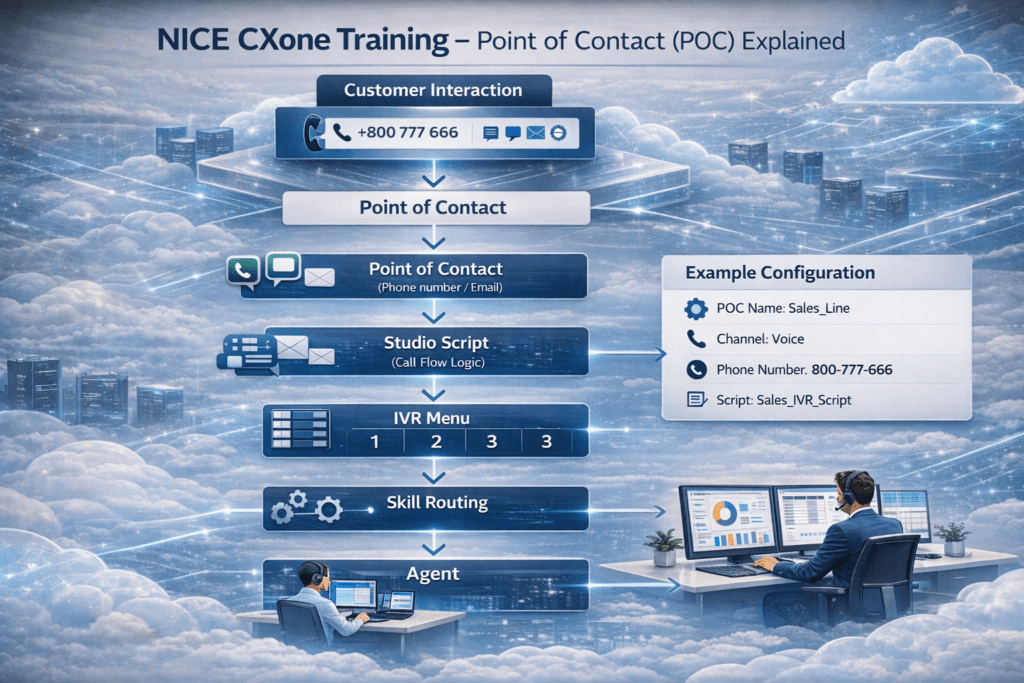
Nice CXone point of contact (POC) is the entry point where all customer interactions enter the NICE CXone platform, making it one of the most important concepts to understand. NICE CXone Training helps professionals learn how interactions such as calls, chats, emails, and messages flow through the system using POC mapping and routing logic. One of the key concepts in NICE CXone Training is understanding how the Point of Contact connects customer channels to Studio scripts and controls the entire interaction flow.
What is Point of Contact (POC)?
In NICE CXone, a Point of Contact (POC) is the entry point where a customer interaction enters the system.
Every interaction—whether it is a phone call, email, chat, SMS, or social channel—first enters the platform through a POC.
The POC is mapped to a Studio script, which controls the entire call flow and routing logic.
Think of a Point of Contact as the front door of a contact center.
Customer Channels Represented by POC
A Point of Contact represents the customer channel, which can include:
📞 Phone number (DID / Toll-free number)
💬 Chat widget
📧 Email address
📱 SMS number
🌐 Social channel
Each channel is mapped to a specific script in NICE CX Studio.
How Point of Contact Works in NICE CXone
The workflow of a POC in NICE CXone is simple but powerful.
- Customer calls the support number
- System checks the incoming number
- Number is matched with the Point of Contact
- POC loads the mapped Studio Script
- IVR menu plays (Press 1 for Sales, 2 for Support, 3 for Billing)
- Interaction routes to the Skill
- Call is assigned to the Agent
This process allows organizations to control how every customer interaction flows through the contact center.
Example of a NICE CXone Point of Contact Configuration
Example POC configuration:
POC Name: Sales_Line Channel: Voice Phone Number: 800-777-666 Script: Sales_IVR_Script
When a customer calls this number, the call is automatically routed through the mapped script and IVR flow.
Creating a NICE CXone Point of Contact in NICE CXone
To create a POC, follow these steps:
- Log in to NICE CXone Admin Portal
- Go to ACD
- Click Points of Contact
- Create a new POC
- Select the channel type (Voice, Email, Digital)
- Map the DID phone number
- Assign theStudio Script
Now the customer interaction is connected to the call flow logic.
Where to Create the Script?
Lorem ipsum dolor sit amet, consectetur adipiscing elit. Ut elit tellus, luctus nec ullamcorper mattis, pulvinar dapibus leo.
Scripts used in POC routing are created using NICE CX Studio.
NICE CX Studio
NICE CX Studio is a desktop application used to design call flows.
You can download and install:
StudioSetup.exe
After installing:
- Open Studio application
- Login using Session ID authentication
- Go to Browse to see scripts
- Create folders for call flows
- Use Tools panel to drag and drop component
Creating a Call Flow Script
Steps to create a script in NICE CX Studio:
1️⃣ Open Studio
2️⃣ Click File → New Script
3️⃣ Choose script type:
• Generic
• Phone
• Voicemail
• Digital
4️⃣ Drag components into the canvas
5️⃣ Save the script inside a folder
Example scripts:
• Generic script
• Phone call flow
• Voicemail flow
Each script is represented with different icons.
Why Point of Contact is Important
The Point of Contact plays a critical role in the NICE CX platform because it:
• Controls customer interaction entry
• Maps communication channels
• Connects DID numbers to scripts
• Enables automated IVR routing
• Sends interactions to the right agents
Without POC mapping, the system cannot route customer interactions correctly.