
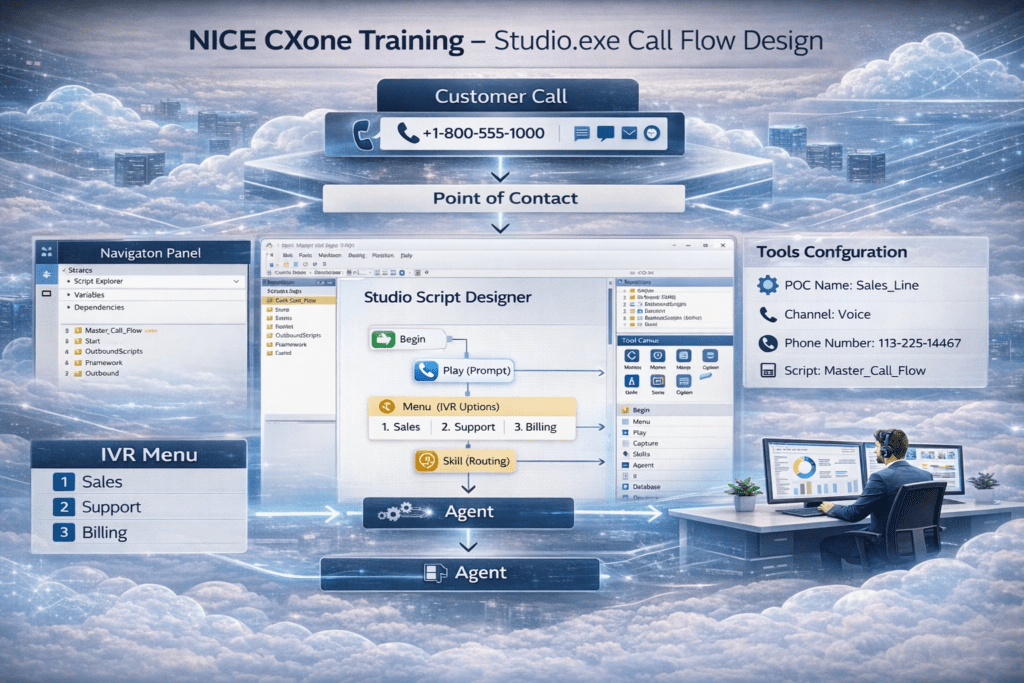
Advanced NICE CXone Studio EXE: Call Flow Design Explained
Nice CXone Studio EXE is one of the most important tools engineers learn when working with NICE CXone contact centers. In NICE CXone Training, Studio.exe is used as the primary desktop scripting tool to design call flow scripts that control how customer interactions move through the system.
These scripts define the complete journey of a customer interaction, ensuring that every call, email, or digital request follows a structured workflow. In a modern cloud contact center, this workflow is designed and managed inside NICE CXone Studio.
Simply put, Studio.exe is the tool used to design and control the entire customer journey in a NICE CXone contact center.
What is Studio.exe in NICE CXone?
Studio.exe is the desktop application used by engineers to create interaction routing scripts.
These scripts control how customer requests move through the system.
Using Studio.exe, engineers can design workflows for:
• Voice call flows
• IVR menus
• Chat interactions
• Email automation
• SMS routing
• Digital channels
Every script created in Studio will eventually be mapped to a Point of Contact (POC).
Why Studio.exe is Used in NICE CXone
The main purpose of Studio.exe is to allow engineers to visually design call flows.
Instead of writing complex code, engineers can create workflows using a drag-and-drop interface.
Inside Studio, you simply drag blocks like:
• Begin
• Play Announcement
• Menu
• Capture Digits
• Skill Routing
• Agent Transfer
These blocks are connected to create a complete customer interaction journey.
This visual design approach makes NICE CXone contact center configuration faster and easier.
How Call Flow Scripts Work in NICE CXone
Every interaction entering a contact center follows a simple process.
Customer Interaction
↓
Point of Contact (POC)
↓
Studio Script
↓
IVR Menu
↓
Skill Routing
↓
Agent
For example:
A customer calls the support number.
The system checks the DID number.
That number is mapped to a Point of Contact.
The Point of Contact loads the Studio Script, which controls the call flow.
The script plays the IVR message:
Press 1 for Sales Press 2 for Support Press 3 for Billing
Based on the selection, the call is routed to the correct skill and agent.
Mapping Scripts to Point of Contact (POC)
In NICE CXone, every phone number or digital channel must be linked to a Point of Contact.
The Point of Contact acts as the entry point of the contact center.
Example configuration:
POC Name: Sales_Line Channel: Voice Phone Number: 113-225-14467 Script: Master_Call_Flow
When a customer calls that number, the system loads the mapped Studio script automatically.
Understanding the Studio Interface
The NICE CXone Studio interface contains three main sections.
1️⃣ Script Canvas
The middle section where you build the call flow.
You drag blocks such as:
Begin → Play → Menu → Skill → Agent
This is where the customer journey is designed.
2️⃣ Navigation Panel
The left panel shows:
• Script Explorer
• Variables
• Dependencies
It helps engineers navigate scripts and folders.
3️⃣ Tools Panel
The right side contains the drag-and-drop actions.
Examples:
• Begin
• Menu
• Play
• Capture
• Hangup
• If Conditions
• Database Access
These tools allow engineers to create complex automation workflows.
Script Types in NICE CXone Studio
When creating a new script, several options are available.
Examples include:
Generic Scripts Phone Scripts Voicemail Scripts Email Scripts Chat Scripts SMS Scripts Digital Channel Scripts
Each script type uses a different icon, which helps engineers quickly identify the interaction type.
Desktop Studio vs Web Studio
NICE CXone currently supports two versions of Studio.
Desktop Studio.exe
• Full scripting capability
• Better visualization
• Faster editing
• Recommended for engineers
Web Studio
• Browser-based interface
• Useful for quick checks
• Good for reviewing scripts
However, most engineers prefer the Desktop Studio version for designing call flows
Conclusion
Studio is the tool that controls how customer interactions flow through the contact center.
From IVR menus to skill routing and automation, everything begins inside Studio.
Once scripts are created, they are mapped to Points of Contact, allowing customer interactions to be processed automatically.
This is how modern AI-driven cloud contact centers operate.
If you want hands-on NICE CXone Training with practical labs, learn from real engineers-Voip Trainers
