What is ADDCFR in NICE CXone?
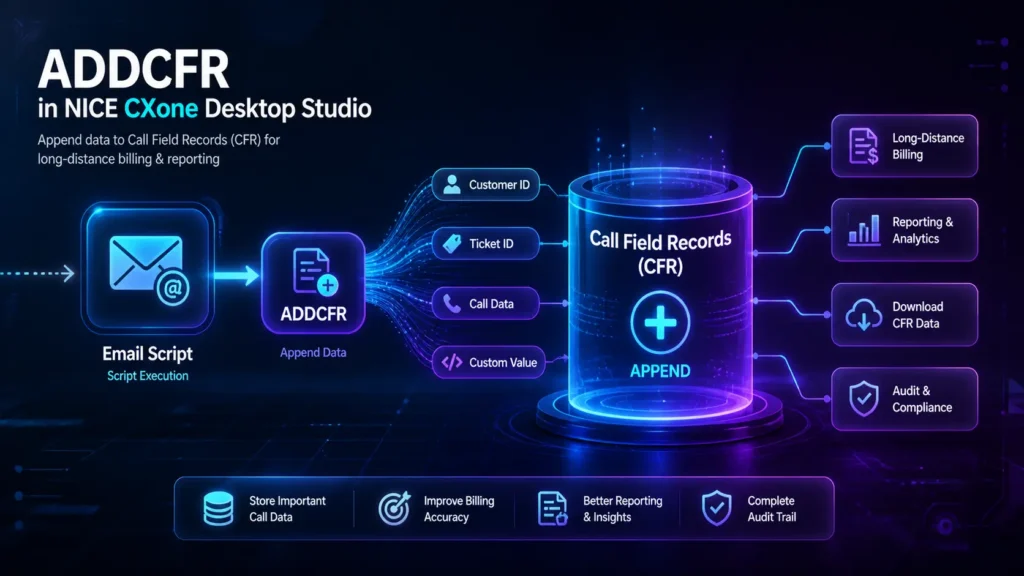
ADDCFR is an action in NICE CXone Desktop Studio that allows you to append data to Call Field Records (CFRs).
These CFRs are part of long-distance call records and can be downloaded for billing, reporting, and auditing purposes.
In simple terms:
ADDCFR helps you store additional data into call records for tracking and billing.
Why ADDCFR is Important
In contact center environments, especially for long-distance billing, capturing extra call details is critical.
Using ADDCFR, you can:
- Add custom values to call records
- Track specific call-related information
- Improve reporting and billing accuracy
- Enable detailed auditing
Where ADDCFR is Used
ADDCFR is mainly used in:
- Email scripts (currently supported script type)
- Billing-related workflows
- Reporting and analytics setups
- Call tracking systems
Important:
ADDCFR is not available in the new Studio (Controlled Release) yet. It is only available in Desktop Studio.
How ADDCFR Works
Here’s a simple flow:
- A script executes during a customer interaction
- ADDCFR action is triggered
- A value is appended to the Call Field Record
- The data becomes part of the call log
- It can later be downloaded for billing/reporting
Think of it like adding notes to a call record for future use.
Supported Script Types



Currently, ADDCFR supports:
- Email scripts only
Make sure your script type matches before using this action
Input Properties of ADDCFR
Caption
- A custom name for the action
- Appears on the script canvas
- Helps identify the action easily
CfrValue
- The actual value that will be added to the CFR
- Can include:
- Static values
- Variables
- Dynamic data
Example:
- Customer ID
- Transaction ID
- Call category
- Support case number
Result Branch Conditions
Result branch conditions help control the flow after ADDCFR executes.
Default Branch
- This is the standard execution path
- Used when no other conditions are defined
- Ensures the script continues smoothly
In most cases, ADDCFR uses only the Default branch.
Practical Example
Scenario: Email Support Tracking
A company wants to track email interactions for billing and reporting.
Script Flow:
- Customer sends an email
- Script processes the request
- ADDCFR is triggered
- The system appends:
- Customer ID
- Issue type
- Ticket number
Result:
- Data is stored in Call Field Records
- Reports can be generated later
- Billing becomes more accurate
When to Use ADDCFR
Use ADDCFR when:
- You need to store extra call or interaction data
- You want better billing tracking
- You are building reporting workflows
- You need custom data inside call records
When NOT to Use ADDCFR
Avoid ADDCFR if:
- You don’t need billing or reporting data
- You are using unsupported script types
- You only need temporary variables (use script variables instead)
Best Practices
- Use meaningful CfrValue names
- Avoid unnecessary data to keep records clean
- Ensure values are properly formatted
- Test before deploying in production
- Use consistent naming conventions
Key Limitations
- Only works with Email script type
- Not available in new Studio (CR version)
- Requires proper configuration for reporting
ADDCFR vs Other Data Methods
Feature | ADDCFR | Variables | Database |
Persistent Data | ✅ Yes | ❌ No | ✅ Yes |
Billing Usage | ✅ Yes | ❌ No | ❌ No |
Reporting Ready | ✅ Yes | ❌ No | ✅ Yes |
Complexity | Low | Low | High |
Conclusion
ADDCFR in NICE CXone Desktop Studio is a powerful action for capturing and storing important call data.
It plays a key role in:
- Billing systems
- Reporting workflows
- Data tracking
By using ADDCFR correctly, you can improve:
- Data accuracy
- Operational insights
- Customer interaction tracking-Voip Trainers