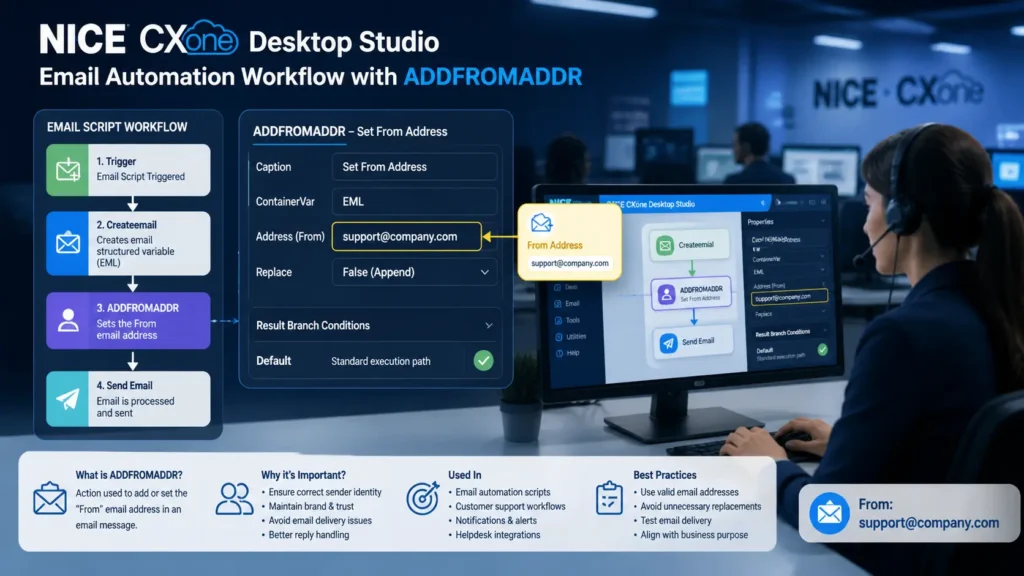
In modern contact centers, email automation plays a vital role in ensuring smooth communication with customers. One of the essential actions used in email scripting is ADDFROMADDR in NICE CXone Desktop Studio. This action helps define the sender’s email address in automated email workflows, making your communication more structured and professional.
What is ADDFROMADDR in NICE CXone Desktop Studio?
ADDFROMADDR is an action used in NICE CXone Desktop Studio to add or set the “From” email address in an email message. It works with structured variables created using the Createemail action.
In simple terms:
It tells the system who the email is being sent from.
Why ADDFROMADDR is Important
Setting the correct sender address is crucial in business communication. Using ADDFROMADDR in NICE CXone Desktop Studio helps you:
- Ensure emails come from the correct department or agent
- Maintain brand identity and professionalism
- Avoid email delivery issues or spam flags
- Enable better reply handling from customers
- Improve trust and communication clarity
Where ADDFROMADDR is Used
This action is mainly used in:
- Email automation scripts
- Customer support workflows
- Notification systems
- Helpdesk and ticketing integrations
Outbound email communication
Supported Script Types
Currently, ADDFROMADDR supports:
- Email scripts only
Make sure your script type is set to Email before using this action.
How ADDFROMADDR Works
Here’s a simple workflow:
- An email script is triggered
- A Createemail action creates a structured variable
- ADDFROMADDR is used to define the sender address
- The email is processed and sent to the customer
Think of it like assigning a sender name before sending a message
Input Properties of ADDFROMADDR
Understanding the properties helps you use the action effectively:
- Caption
- A custom label for the action
- Appears on the script canvas
- Helps identify the action easily
- ContainerVar
- The structured variable that holds email data
- Default value: EML
- Stores all email-related fields like To, From, Subject, etc.
- Address
- The email address that appears in the From field
- Example: support@company.com
- This is what the customer sees as the sender
- Replace
- A boolean value (True/False)
- False (default): Appends to existing sender list
- True: Replaces the existing sender
Use this carefully to control how sender data is handled.
Result Branch Conditions
Branch conditions control what happens after the action runs.
Default Branch
- The standard execution path
- Used when no other conditions are defined
- Ensures smooth script continuation
In most cases, only the Default branch is used with ADDFROMADDR.
Practical Example
Scenario: Customer Support Email
A company wants all support emails to come from a dedicated support address.
Script Flow:
- Customer submits a request
- Email script is triggered
- Createemail action initializes email structure
- ADDFROMADDR sets:
- support@company.com as sender
- Email is sent to the customer
Result:
- Consistent sender identity
- Professional communication
- Better response management
When to Use ADDFROMADDR
Use this action when:
- You need to define a sender email address
- You are building automated email workflows
- You want consistent branding in emails
- You need control over outgoing email identity
When NOT to Use ADDFROMADDR
Avoid using it when:
- You are not working with email scripts
- The sender address is already predefined elsewhere
- You don’t need to modify the From field
Best Practices
To get the best results:
- Use valid and active email addresses
- Maintain consistent naming conventions
- Avoid unnecessary replacements
- Test email delivery before deployment
- Align sender address with business purpose
Key Limitations
- Works only with Email script type
- Requires Createemail action beforehand
- Misconfiguration can affect email delivery
ADDFROMADDR vs Other Email Actions
Feature | ADDFROMADDR | ADDTOADDR | ADDCCADDR |
Sets Sender | Yes | No | No |
Adds Recipient | No | Yes | Yes |
Email Control | Medium | High | Medium |
Usage | From field | To field | CC field |
Conclusion
ADDFROMADDR in NICE CXone Desktop Studio is a simple yet powerful action that ensures your emails have the correct sender identity. It plays a key role in maintaining professional communication, improving customer trust, and managing automated email workflows effectively.
By using this action correctly, you can build structured and reliable email automation systems within your contact center-VoipTrainers