What is Askcaller in NICE CXone?
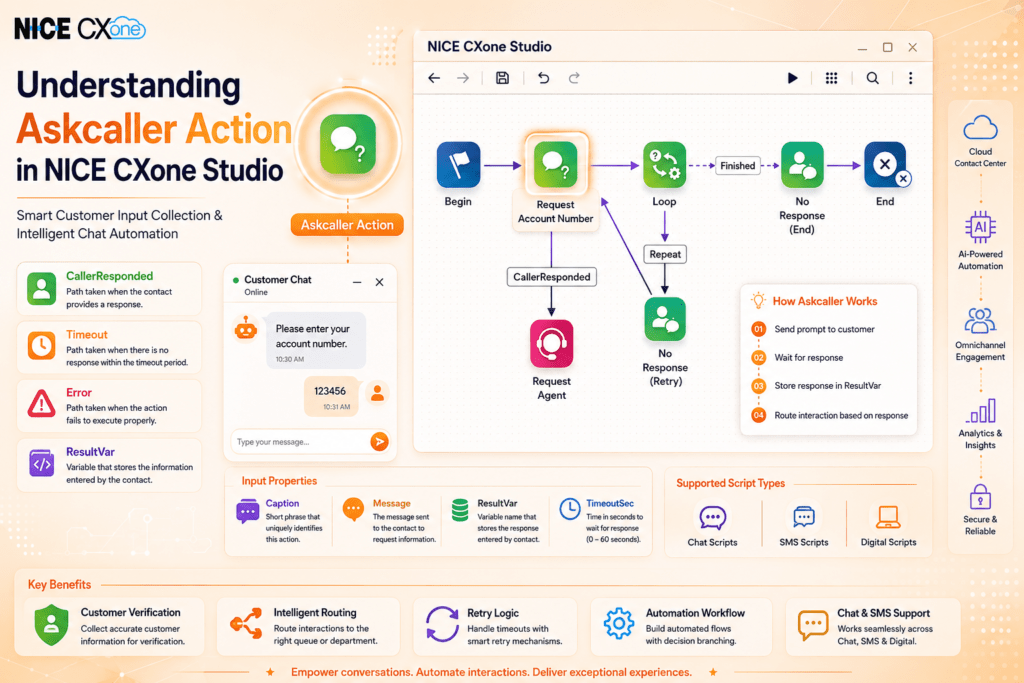
The Askcaller action in NICE CXone Studio is used to request information from a chat, SMS, or digital contact during an interaction.
This action allows contact center workflows to collect important customer details such as:
- Account numbers
- Customer names
- Email addresses
- Ticket IDs
- Verification information
- Any custom input required for routing or support
The Askcaller action plays an important role in self-service automation and intelligent customer interaction workflows.
Supported Script Types

Askcaller Action Icon
The following image shows the official Askcaller action icon used inside NICE CXone Studio.
Askcaller Action Icon
The icon visually represents a customer interaction request with a chat bubble and question mark, indicating user input collection.
Askcaller Action Icon
The following image shows the official Askcaller action icon used inside NICE CXone Studio.
Askcaller Action Icon
The icon visually represents a customer interaction request with a chat bubble and question mark, indicating user input collection.
Why Use Askcaller in NICE CXone?
The Askcaller action helps businesses:
- Collect customer information automatically
- Reduce agent handling time
- Improve workflow automation
- Route interactions intelligently
- Validate customer details before agent transfer
- Create personalized customer experiences
It is commonly used in chatbots, live chat routing, SMS automation, and digital engagement workflows.
Supported Script Types
The Askcaller action supports the following script types in NICE CXone Studio:
- Chat Scripts
- SMS Scripts
- Digital Scripts
This makes Askcaller highly flexible for omnichannel customer communication.
Input Properties of Askcaller Action
Caption
Defines a custom label for the action on the script canvas.
Message
The message displayed to the contact requesting information.
Example:
“Please enter your account number.”
ResultVar
Stores the customer’s response inside a variable.
Example:
If the customer enters:
123456
The variable stores:
123456
TimeoutSec
Defines how many seconds the system waits for a response.
Supported range:
- 0 to 60 seconds
If the customer does not respond within this time, the script follows the Timeout branch.
Result Branch Conditions
The Askcaller action supports multiple branching outcomes.
Branch | Description |
Default | Standard execution path |
Timeout | Triggered when no response is received |
CallerResponded | Triggered when the customer replies |
Error | Triggered when execution fails |
These branches allow developers to build intelligent customer interaction flows.
Askcaller Script Workflow Example
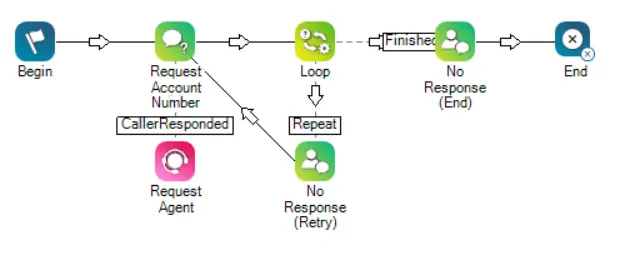
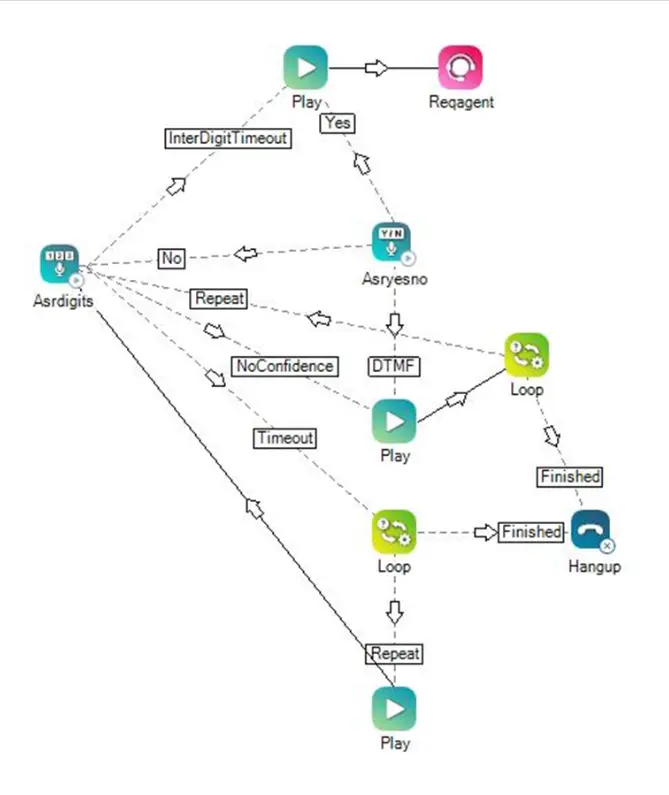
The following uploaded image shows a real Askcaller workflow inside NICE CXone Studio.
Askcaller Workflow Example
In this workflow:
- The script begins with the Askcaller action
- The customer is asked to enter an account number
- If the customer responds, the interaction moves to the Reqagent action
- If no response is received, the script loops back using the Loop action
- Retry attempts continue until the configured limit is reached
- After multiple failed attempts, the script ends gracefully
This workflow demonstrates intelligent retry handling and customer response validation.
How Askcaller Works in NICE CXone
Step 1 — Send Prompt to Customer
The Askcaller action sends a message requesting input.
Step 2 — Wait for Response
The script pauses until the customer replies or timeout occurs.
Step 3 — Store Response
The entered value is stored in the ResultVar variable.
Step 4 — Route Interaction
Based on the response, the script moves to the next workflow branch.
Real-Time Use Cases of Askcaller
Businesses commonly use Askcaller for:
- Customer account verification
- Order number collection
- Ticket ID validation
- OTP confirmation
- Customer feedback collection
- Self-service automation
- Intelligent routing before agent transfer
Benefits of Using Askcaller
Improves Customer Experience
Customers can quickly provide information without agent involvement.
Reduces Agent Workload
Collects important details before transferring interactions.
Supports Automation
Enables chatbot-style workflows and self-service systems.
Enhances Routing Accuracy
Customer input can determine the correct queue or department.
Handles Timeouts Efficiently
Loop and retry logic improve interaction management.
Related Workflow Components
The Askcaller action is often used together with:
- Loop
- Reqagent
- If
- Snippet
- Menu
- Decision logic
- Timeout handling actions
Together, these actions create intelligent customer engagement flows.
Example Customer Interaction Flow
Example workflow:
- Customer starts chat
- Askcaller requests account number
- Customer enters details
- System validates input
- Interaction routes to correct support team
This reduces manual handling and speeds up customer service operations.
Script Example
In the following script, the Askcaller action requests an account number from the contact. If the contact provides an account number, they are passed on to an agent through the Reqagent action. If the contact does not respond, the interaction is looped back to the account number prompt. This occurs up to the number of times specified in the Loop action. Each loop sends a message explaining that the system did not receive a response from the contact. If no response is received after the specified number of loops, a different message is sent to inform the contact that no account number was received, then the interaction ends.
Related Visual Examples


Conclusion
The Askcaller action in NICE CXone Studio is a powerful tool for collecting customer information during chat and digital interactions. With support for branching, retries, timeout handling, and intelligent routing, Askcaller helps organizations build efficient and user-friendly automation workflows inside modern cloud contact centers-NICE CXone Training | Voip Trainers.