The NICE CXone Askcaller action is one of the most important workflow components used in digital customer communication automation. It helps contact centers collect customer information during live chat, SMS, WhatsApp, Facebook Messenger, and other digital interactions.
Askcaller is commonly used in chatbot automation, intelligent routing, customer verification, and self-service workflows. It pauses the script and waits until the customer responds, making it highly useful for asynchronous digital communication.
Supported Script Types
Digital
The Askcaller action has separate help pages for the other supported script media types: SMS or chat.
Script Example
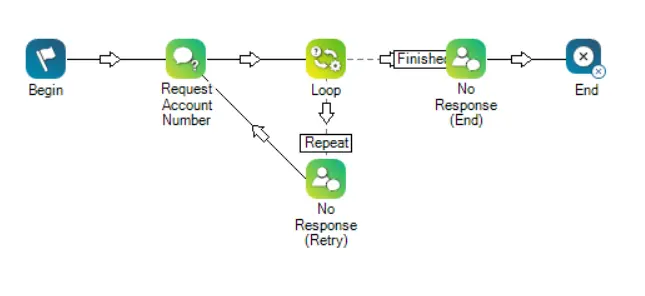
In the following script, the AskCaller action requests an account number from the contact. If the contact provides an account number, they are passed on to an agent through the Reqagent action.
Currently, using Reqagent with Askcaller in digital scripts requires a SNIPPET action. Additionally, it also requires the assistance of NiCE CXone Expert Services.
If the contact does not respond, the interaction is looped back to the account number prompt. This occurs up to the number of times specified in the Loop action. Each loop sends a message explaining that the system did not receive a response from the contact. If no response is received after the specified number of loops, a different message is sent to inform the contact that no account number was received, then the interaction ends.
What is Askcaller Action in NICE CXone?
The Askcaller action in NICE CXone Studio requests information directly from the customer during a digital interaction.
Businesses use Askcaller to collect:
Account numbers
Customer names
Email addresses
Ticket IDs
OTP verification
Order details
Customer feedback
Any custom input required for support workflows
Unlike traditional voice scripts, Askcaller in digital channels can wait for responses even for days or weeks, supporting the asynchronous nature of messaging platforms.
Relevant Askcaller Action Visuals
Askcaller Action Icon
The Askcaller icon usually appears as a chat bubble with a question mark, representing customer input collection inside digital workflows.
Supported Digital Channels
Askcaller supports multiple digital communication channels including:
Live Chat
SMS
WhatsApp
Facebook Messenger
Apple Messages for Business
Digital Experience (DX) messaging channels
This makes it ideal for omnichannel customer engagement automation.
Why Businesses Use Askcaller Action
Modern contact centers use Askcaller because it improves both customer experience and operational efficiency.
Key Benefits
Automates Customer Data Collection
Askcaller automatically gathers customer information before transferring the interaction to an agent.
Customer responses can determine which department or queue receives the interaction.
Supports Self-Service Workflows
Businesses can create chatbot-style automated support systems.
Enhances Customer Experience
Customers can quickly provide details without waiting for a live agent.
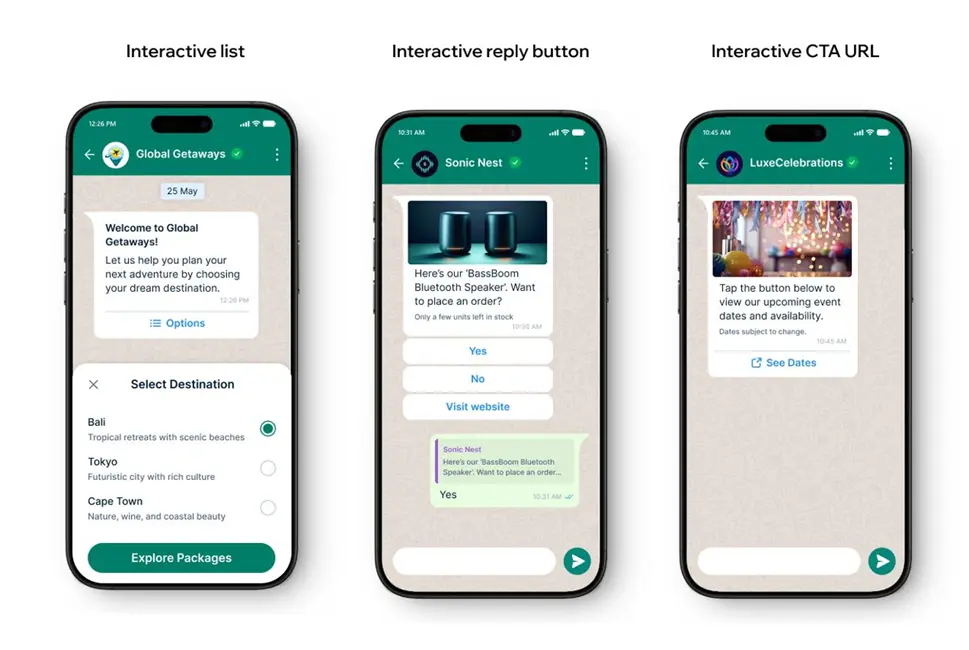
Supports Rich Media Interactions
Askcaller can send:
Buttons
Menus
Quick replies
Carousels
Interactive forms
using JSON-based rich messaging.
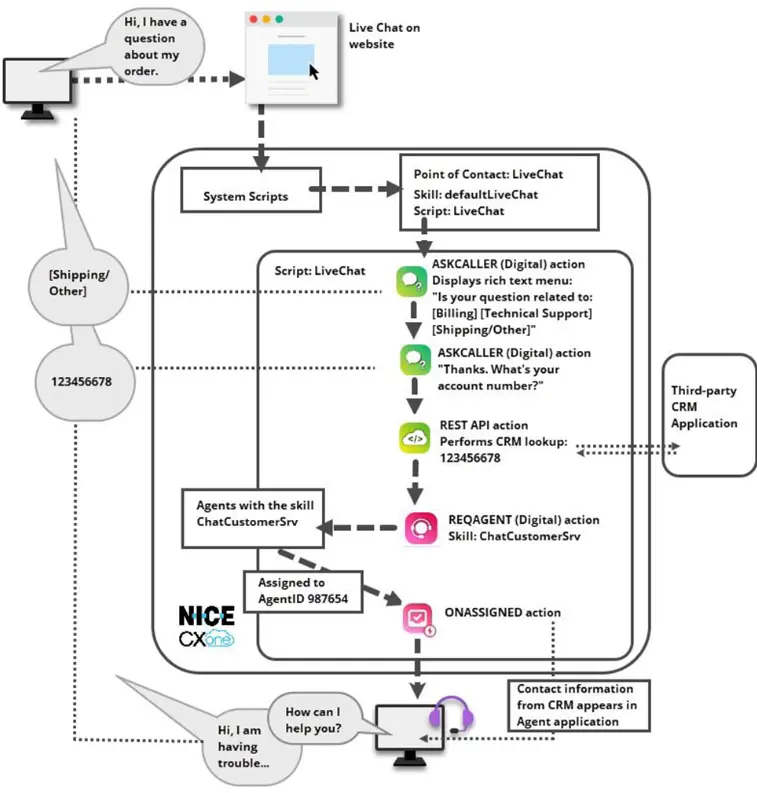
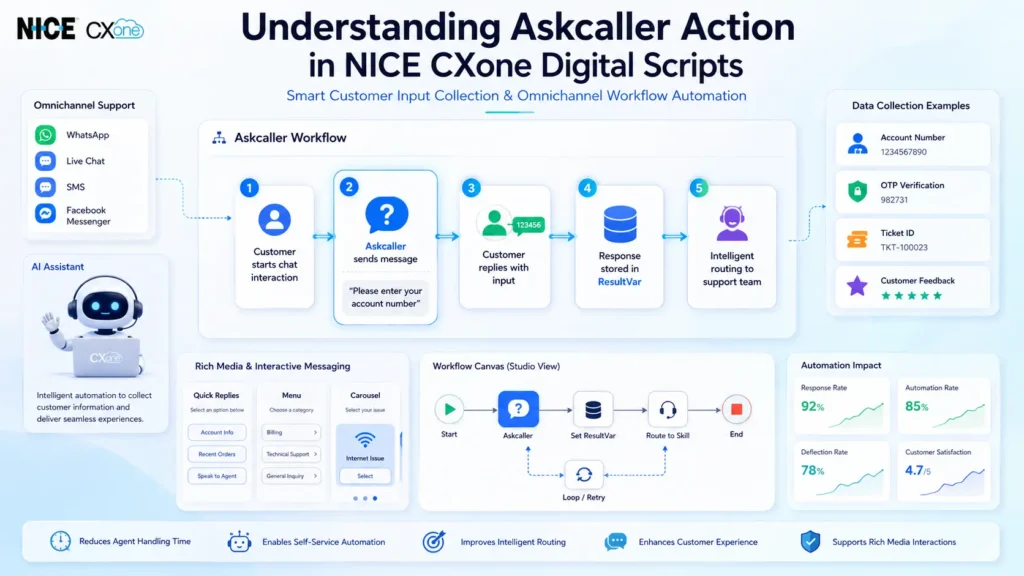
Askcaller Workflow Example
Digital Workflow Example
Example Workflow Process
Customer starts chat interaction
Askcaller requests account number
Customer enters information
Script stores response in ResultVar
System validates customer input
Interaction routes to correct support team
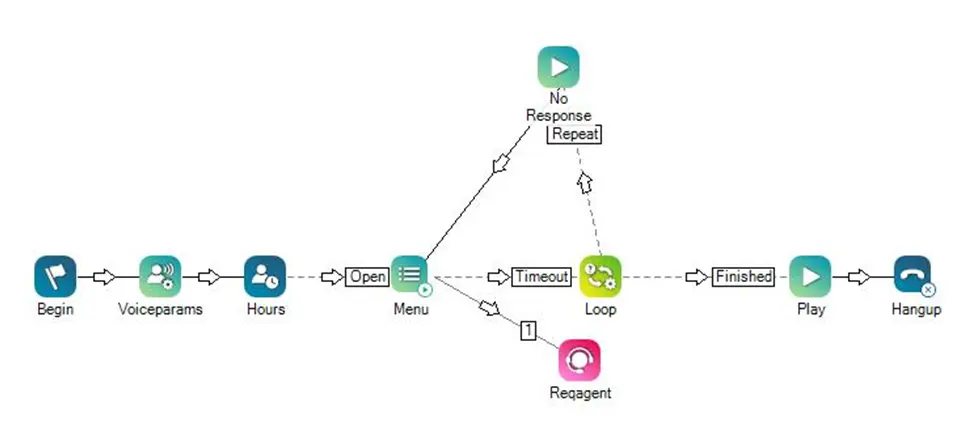
If no response occurs, Loop action retries
After retry limits, interaction ends gracefully
This workflow improves automation accuracy and customer engagement.
Important Input Properties of Askcaller
Caption
Defines the custom label displayed on the Studio canvas.
Message
The text message sent to the customer.
Example:
“Please enter your account number.”
MessageFormat
Defines how the message is sent.
Supported formats:
Text
JSON
PromptSequence
JSON and PromptSequence are used for rich media messaging.
ResultVar
Stores the customer’s response.
Example: If customer enters:
123456
The variable stores:
123456
TimeoutSec
Defines how long the script waits for customer input.
0 = Wait indefinitely
Custom values = Timeout after specified seconds
Askcaller Result Branch Conditions
The Askcaller action supports multiple branch outcomes.
Branch
Description
Default
Standard execution path
On Timeout
Triggered when no response is received
On CallerResponded
Triggered when customer replies
On Error
Triggered when execution fails
These branches help developers create intelligent automation workflows.
Rich Media Support in Askcaller
Rich Messaging Examples
Askcaller supports rich messaging content such as:
Quick reply buttons
Menus
Carousels
Time pickers
Interactive forms
Rich media allows businesses to build advanced conversational experiences inside messaging platforms.
Real-Time Use Cases of Askcaller
Businesses commonly use Askcaller for:
Customer account verification
OTP authentication
Order tracking
Appointment confirmation
Ticket ID validation
Feedback collection
Intelligent chatbot routing
Pre-agent qualification workflows
Tips and Best Practices
Use Retry Loops
Add Loop actions to retry when customers do not respond.
Add Reminder Messages
Send follow-up prompts such as:
“Are you still there?”
Combine with Virtual Agents
Askcaller works effectively with AI virtual agents for conversational automation.
Use Rich Media Carefully
Different digital channels support different JSON schemas and interactive features.
Conclusion
The Askcaller action in NICE CXone Digital Scripts is a powerful customer interaction tool used for collecting customer input, automating workflows, and improving digital engagement. With support for intelligent branching, asynchronous messaging, rich media, and omnichannel communication, Askcaller helps businesses create scalable and user-friendly customer service automation systems-NICE CXone Training | Voip Trainers.