Agent Workflow Configuration in NICE CXone (Detailed Guide)
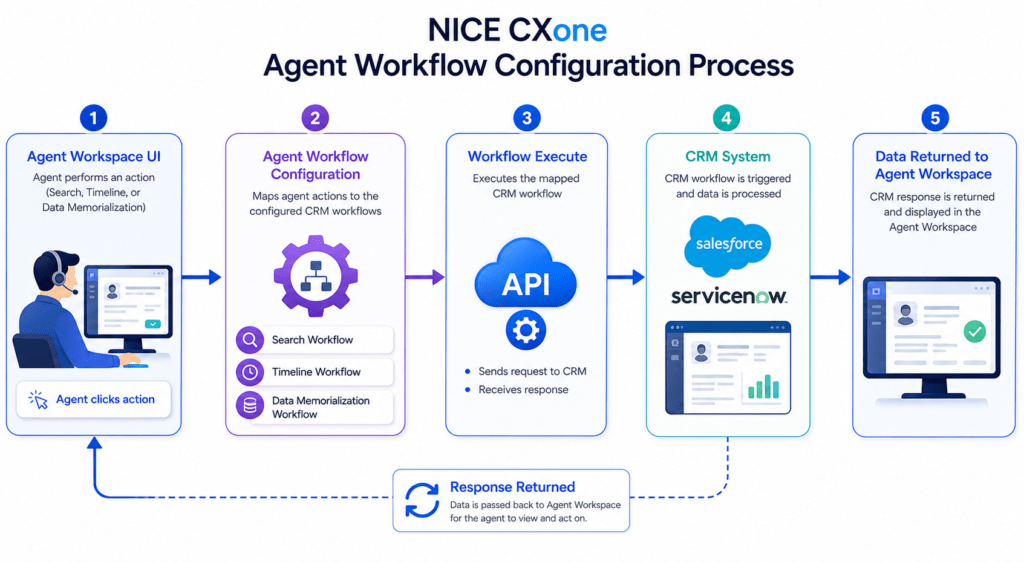
Agent Workflow Configuration in NICE CXone Agent Workflow Configuration is a key action in NICE CXone Desktop Studio used to connect your CRM workflows with the Agent Workspace. In simple terms: It tells the system“When an agent performs an action → trigger this CRM workflow.” This is essential when integrating platforms like Salesforce, ServiceNow, or any CRM with NICE CXone. Why This Action is Important Without this configuration: Agents cannot trigger CRM workflowsCustomer data won’t sync properlyAutomation inside Agent Workspace won’t work With it: Agents get real-time CRM dataAutomation reduces manual workCustomer experience improves What Agents Can Do Using This This action enables 3 major agent activities: 1️. Search (Second-Level Search) Agent clicks Refresh/Search Gets more detailed customer data 2️. Add Timeline Activity Agent logs interaction into CRM Example: “Customer called regarding billing issue” 3️. Data Memorialization (ACD Data Mapping) Stores call/chat data into CRM fields Example: Call duration Agent ID Queue name High-Level Workflow Diagram Here’s how everything connects: Agent Action (Workspace) ↓ Agent Workflow Configuration ↓ Workflow Execute Action ↓ CRM Workflow Triggered ↓ CRM (Salesforce / ServiceNow) ↓ Data Displayed Back in Agent Workspace Where to Find It in Studio Location: Framework Tab → Agent Workflow Configuration Dependencies Before using this action, ensure: Agent Application Agents must use one of: Agent Workspace (Desktop) Agent Workspace (Browser Extension) Agent for Microsoft Teams CRM Integration Setup Must be configured in Agent Integrations page At least one workflow must exist Login Requirement To use the wizard:Login using CXone username & password Session ID login → Wizard won’t open Required Pairing You MUST use: Agent Workflow Configuration + Agent Workflow Execute These two always work together. Script Type Support Phone ScriptsDigital Scripts (Chat, Email, etc.) Input Properties Caption Label for your action Example: CRM Workflow Setup AgentUserID Important difference: Script Type Format Phone {__AgentID} Digital {AgentID} Wrong format = data won’t show in UI SearchWorkflow Workflow used when agent performs search TimelineWorkflow Workflow used when agent logs activity DataMemorializationWorkflow Workflow used to store ACD data in CRM SearchCacheKey Used to pass search results from: Workflow Execute → Agent Workspace Leave empty if using Custom Event instead of cache SearchInput Dynamic search field (configured in wizard) Example: phone number, email, customer ID Workflow Configuration Diagram +——————————+ | Agent Workflow Configuration | +——————————+ | | | ↓ ↓ ↓ Search Timeline DataSave Flow Flow Flow ↓ ↓ ↓ CRM Workflows (Mapped) Result Branch Conditions (Error Handling) These help your script handle different situations: Condition Meaning Default Normal path Success Everything worked InvalidAgentId Agent ID incorrect AgentNotConnected Agent offline InvalidWorkflowConfigData Wrong config Branching Diagram Action Executes ↓ ——————- | | | Success Error Invalid | | | Continue Retry Alert Configuration Wizard (Step-by-Step) Step 1: Open Wizard Double-click the action Step 2: Select CRM Configuration Choose integration (e.g., Salesforce) Step 3: Select Agent Actions ✔ Search✔ Timeline✔ Data Memorialization Step 4: Map Workflows Example: Action Workflow Search Customer Lookup Timeline Case Notes Update Data Save Call Details Step 5: Save Configuration Click SaveProperties auto-fill Full Integration Flow Diagram [Customer Interaction] ↓ [Agent Workspace UI] ↓ (Agent clicks action) ↓ [Agent Workflow Configuration] ↓ [Workflow Execute] ↓ [CRM API Call] ↓ [CRM System] ↓ [Response Returned] ↓ [Displayed in Agent Workspace] Example Use Case Scenario: Customer Calls Support Agent receives call Clicks Search Customer data loads from CRM Agent handles issue Adds note (Timeline) Call details saved automatically Best Practices Always match same CRM config in both actionsUse correct AgentID formatTest workflows before productionKeep cache key clean unless neededHandle error branches properly Common Mistakes Using {__AgentID} in digital scriptNot linking Workflow ExecuteNo CRM workflow configuredWrong mapping in wizard Final Summary Agent Workflow Configuration = Bridge between Agent + CRM It allows: Smart data retrieval Activity logging Automated data storage When combined with Workflow Execute, it creates a fully automated CRM integration inside NICE CXone Training.
Agent Workflow Configuration in NICE CXone (Detailed Guide) Read More »